

The New Architecture
The New Architecture
Okay, I said in the prior article that we are going to look at a new architecture for our application. We're doing this for the following reasons:
- UI Agnostic
- Host Location Agnostic
- Local LLMs
- Always-on and Completely Autonomous (eventually)
- Skills/Tools Module Extensibility
- Modularity - Isolating development into smaller chunks
- Education - I want to learn new things along the way
This is a solid set of reasons right? Of course, being an engineer and data scientist, we're always improving anyway and there's no time like the present!
Let's dive in
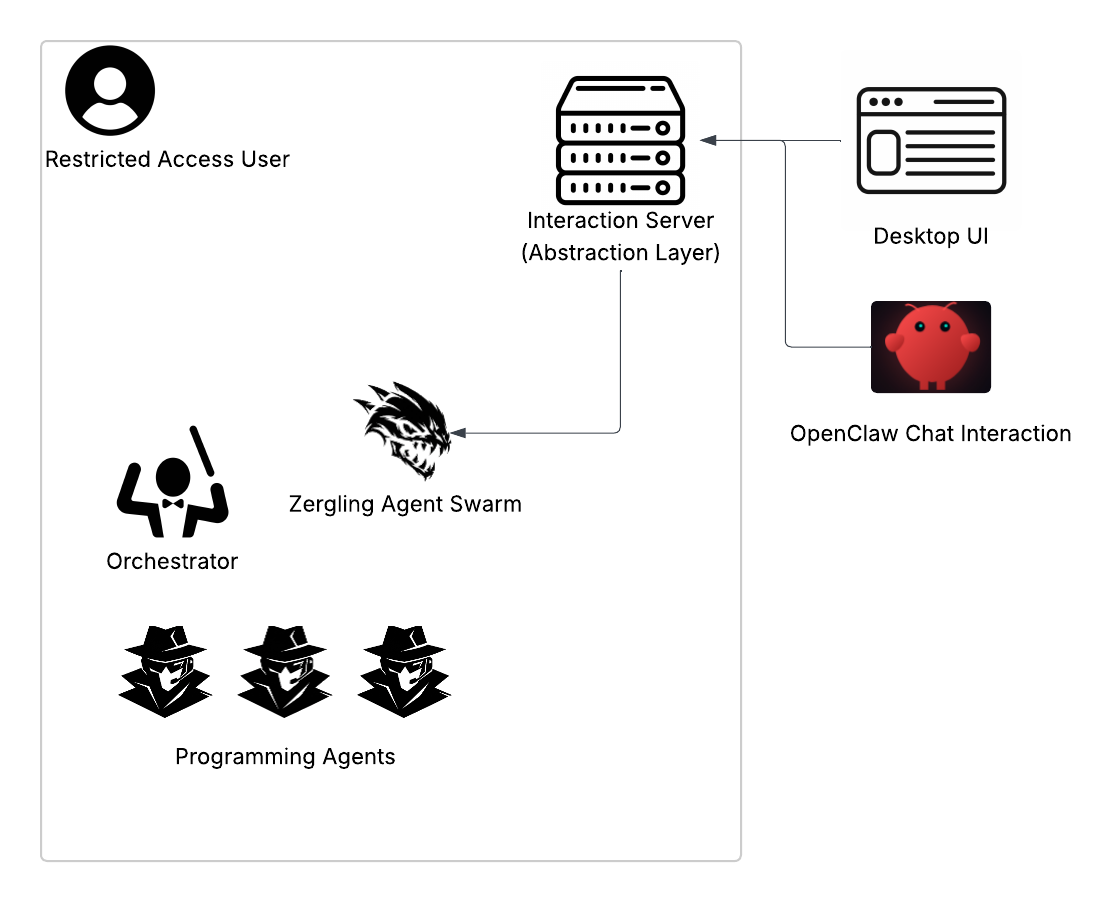
The diagram is clearly representative of our objectives. We're going to build an
isolated UI, likely a web UI to start I suppose, that speaks with a server. This
server will run under a user on my system with restricted access. This is
hopefully obvious to you why, but in case the agents go rogue and try to mess
with my system, they will not have access to any of it outside of their
user/sandbox. NO SUDO ACCESS EITHER  ! The interaction layer will
speak with the Zergling Agent Swarm.
The Swarm itself is the always-on agent loop. This piece of software will be responsible for holding an orchestrator and a team of agents. The orchestrator in our swarm will be responsible for constantly orchestrating actions. This is the birth of the "always-on" objective. Truthfully, it seems like this could be what Clawdbot is doing...but I'm not going to dig into any of that even though it's open source until we have completed this project. Then we will see how similar our systems truly are, without bias in mine. With a loop in place, we can evaluate an overall "Live Plan" (I may call this the Overmind document and stick with our StarCraft theme). The Live Plan will be a series of objectives under constant review by the agent loop. This is how our agent will do things over time. We'll provide the swarm with a scheduler, such as cron, to initiate time-related tasks so we aren't running a hot-loop all of the time. We will also need wake-triggers, such as communicating with the model itself over some medium like the interaction server, or from operating system interrupts, async/awaits, anything of that sort.
while true without system calls like sleep in the loop. This results in an immense amount of cpu usage. Since we'll be hosting models (or even running some from the cloud) this would run up our bill! 💰 💰 💸Let's move into the next section and talk about what the Zergling Swarm looks like.
Zergling Swarm
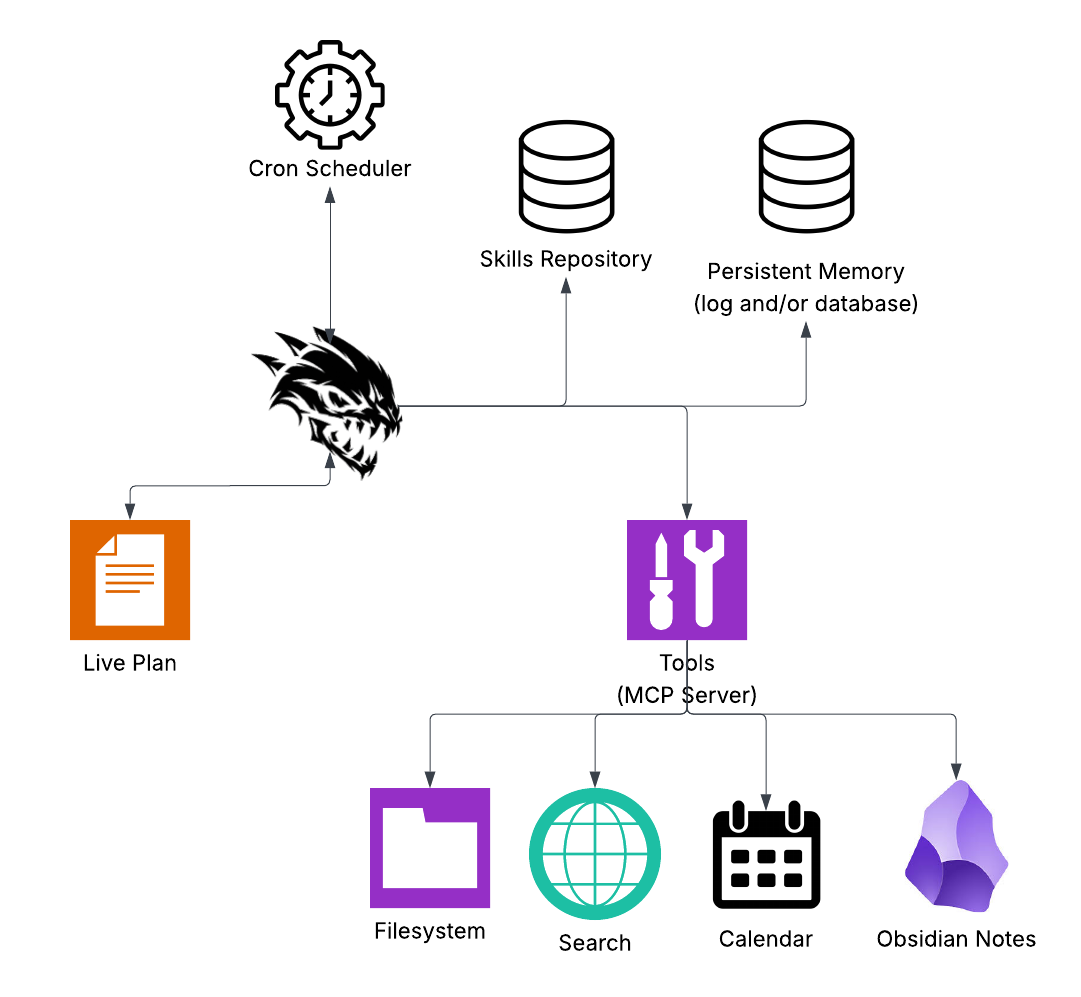
and.....let's break it down!
Live Plan
My current key component of keeping the "always-on" facet of our project. This Live Plan is essentially the plan to stay alive. Instructions in this document will say things like "Every morning, check the calendar for my events and give me a digest of what I have to do today," "Look through my notes to find any tasks that are nearing completion and warn me about them," "Search emails for attachments that contain events and ensure they're on the calendar," and anything else. Other events that I haven't yet thought of could be "every so many hours do X" and my commands to the Live Plan can be "examine the Obsidian Note 'new project idea' and iterate on the project to develop it, check in every so often and see if I've made changes to continue the project" -- this one I'm particularly excited for because, if I can get it to work well enough, I can develop projects immediately when I think of them and by planning them solely in markdown!
Ambitious I know, but this is the "orchestrator" document that we will use to control the swarm! It serves as a base of operations and a way to easily store and modify the plan of staying 'living', fulfilling the always-on mantra of the project.
Cron Scheduler
This one is pretty self-explanatory, but if you don't know what cron is...
Cron is the classic Unix “run this command at this time” daemon. It’s been around forever, and your OS (Linux, macOS, etc.) runs it in the background. You don’t start it yourself—you just tell it what to run and when, and it does the rest. So instead of our Zergling swarm sitting in a hot loop checking the clock, we can say “wake up at 8am and run the morning digest” and let the system handle the timing. How you schedule events You schedule things by editing your crontab—the list of cron jobs for your user. Run: crontab -e That opens your crontab in an editor. Each line is one job. The format is:
┌───────────── minute (0–59)
│ ┌───────────── hour (0–23)
│ │ ┌───────────── day of month (1–31)
│ │ │ ┌───────────── month (1–12)
│ │ │ │ ┌───────────── day of week (0–7, 0 and 7 = Sunday)
│ │ │ │ │
* * * * * command to run
So 0 8 * * * means “at minute 0, hour 8, every day of month, every month,
every day of week”—i.e. 8:00 every morning. 15 * * * * means “every 15
minutes.” The command on the right can be anything your user can run in a shell
-- a script, a binary, curl, etc. For the swarm, we’d point that at whatever
script or service kicks off the “morning digest” or other Live Plan tasks.
The cron scheduler will allow the swarm itself to schedule a call to itself to
do some thing. We may not use cron the system tool specifically, as that does
call a script or binary with some arguments, but we will use the cron library to
schedule tasks that occur on frequencies and likely instead of a script use a
prompt that gets passed back to the swarm to pursue.
Skills Repository
Skills are extremely fascinating. If you have not read about them from my other articles, Anthropic Skills were some of the first formats of skills. These are documents that empower an LLM to perform some tasks. They consist of some yaml frontmatter that describes the skill itself and what it's used for and then the document goes on to inform the LLM how to perform this skill. Skills can range from being simple definitions of how to create a new project in a format you prefer, such as a web project which we all know has so many choices, or to complex definitions like creating MCP servers, powerpoints, or event how to create more skills!
Skills are the backbone of describing to LLMs how to do more complex tasks. They will prove quite useful to us on our journey in creating the Zergling Swarm for our benefit.
One thing I will mention is that Claude itself has a profound model for writing skills it calls Progressive Disclosure which is essentially writing separate files to expound upon the skill. Everyone has said it before and we'll all say it again: Context is King! Maintaining a small, concise, relevant context window is extremely valuable for achieving high quality output. We're going to be running a local model on my somewhat paltry 12gb of vram, so we won't have a very large context window to work with!
It remains to be seen in our research how much programming we'll need to do to achieve this locally or if someone has done the lifting for us and perhaps we can use a sophisticated MCP tool or something to accomplish this task. Nonetheless, it will be quite fun to write if it doesn't exist!
Persistent Memory
Ah yes, memory.
Wait, what was I doing 200,000 tokens ago?
-Some AI
Memory, to me, is hacking context. When we can give the LLM a way to remember and recall specific things over time, then we are essentially allowing a manipulation of the context window itself, but performed entirely by the LLM. There are a few ways we can accomplish memory. We will likely start off simple
Log Memory
Write markdown files to remember shit, you dolt! It's straightforward. We give an agent the ability to record information into a markdown file to recover later when it is needed.
Building daily briefs? Check the memory file for prior daily briefs to see if there is any carry-over worth mentioning.
Interrupted to perform some cron task and now getting back to developing our Android app? Load up the "wtf-was-i-doing.md" memory file and resume where we left off.
It is my goal that the simplest form of memory is compressing a context window into a memory file for use in the future...will it work? We shall see!
Database Memory
This is the more complex version. I imagine that this will be some sort of MCP-laden use of a database with embedding. In fact, as I was writing this section, I found this repository: Persistent AI Memory (damn...was this written in python, though? :sad: may need a Rust version!).
Essentially what we're doing with this form of memory is allowing the use of a vector database + embedding model to store data over time for retrieval at any time through searching, or a key-value store to access memories by name, or something in between. This is a powerful format of memory because we may be able to preserve even more context than text files, which will give us more power!
This is an area where I'm interested in learning more. There was a database I was following the development of a long while ago when it was a young project back in 2021: Pinecone. Now these types of databases are some of the most powerful for AI models! I'll dive into how these work and why they're useful in the future when we get to implementing them.
Tools
Obviously, we need tools. An MCP server is just a must-have at this stage of the game. Tools allow LLMs to interact efficiently with other systems. The MCP server exposes capabilities like "search the filesystem" and "create a new file" and "update a file's contents" to an LLM which can then call these tools with arguments and interact with the world.
We will be using MCP servers extensively in this project, and likely a variety of them! Will we need an MCP aggregate server? An interesting thought.
What is it, really?
An MCP server is a process that speaks MCP (Model Context Protocol) and exposes tools to a client AI. The server might expose “search the filesystem,” “create a file,” “query the database,” “fetch this URL,” “read my calendar,” etc. Each of those is a tool with a name, a description, and a schema for arguments. The client (the swarm) connects to the server, gets the list of tools, and when the model decides “I need to read that file,” it sends a tool call. The server runs the operation and returns the result. The MCP server acts as a bridge. It turns “the model needs to do X” into real actions and real data.
Here is an example format of a tool call:
{
  "tool_call": {
    "tool_name": "calendar.schedule_event",
    "parameters": {
      "attendee": "Hydralisk",
      "date": "2026-01-31",
      "time": "15:00"
    }
  }
}
The MCP server will reach out to the calendar and schedule the event and in this way we are sort of "programming".
Now, imagine this: the swarm realizes it needs the ability to schedule a calendar event and so writes the software and also the MCP tool. Oh shit.
We'll also allow other things like searching the internet, our Obisidian notes vault, and I'm thinking even a tool to "ask a higher power" and communicate with a cloud LLM like GPT-5 or Opus 4.5.
Swarm Structure
The structure of the swarm itself will consist of a "smarter" model, the Orchestrator. This orchestrator will develop plans as output for other agents to work on. It's important that the Orchestrator itself can create resolute, well-defined, and sufficiently small subplans for agents to work on. This will allow success for smaller models so we can try to save some money as we experiment with these models.
The rest of the structure, for now, is the Swarm. These are the lower-level agents that will do the heavy lifting. Read the active plan segment you are given, figure out how to implement it, communicate with MCP servers and memory to get the job done, evaluate your implementation, sign off on its completion to the Orchestrator. I'm thinking this is a good initial setup, simple and easy to use. We may introduce other components in the future as we discover weaknesses with our current setup.
Now, what?
This has been a lengthy description of this architecture. I think it's time we get started. For the most part, although I shit on it earlier, we'll likely also write this in python. Python is extremely powerful for prototyping because it's so easy to write and we aren't largely constrained by performance in these cases. If we require high performance, then we'll shift down into rust and write those tools in a lower level code with high performance.
Stay tuned for the next article. For now, I'm going to get started coding up the new architecture...or overseeing it's creation 🤔...