

The New Year: Goals
What Happened!?
Yikes. It's been so long. I really fell off on my ability to write my blog and focus on my AI study and development. There has been so much going on in both my professional and personal life that I just haven't had the time to devote to my personal projects.
Let's change that! It's time to get back to what we were developing.
The Zergling Project!
Truth be told, there has been so much rapid development in the AI world that many of my ideas have since been created by other folks! Which is what I tell myself...other tools I've stumbled upon that have implemented some of the features I was looking for in the tools I wanted to create. I'll talk about some of them in this article while I renew my vigor and plans for my own project.
Agents
Agents. I mean...damn! The Zergling Project was so named because I wanted to form a swarm of AI agents that could build entire projects for me. One of my original goals for this project was spec-driven development in the form of having a Planner, Implementer, and Evaluator swarm of agents. Well, guess what! Cursor has this, now. They beat me to it! Or at least some of it. I'm sure there's more work that we can be doing in this realm and it's far from perfect. However, I was using the Plan feature the other day and was pleasantly surprised at the ability to investigate what these agents were about to do, correct it, introduce further changes or refinements, and then send them on their way. Incredible!
The Plan feature within Cursor outputs a markdown file that has a staged approach to solving the prompt. This allows for an introspection into the changes and gating each phase behind approval or modification. For me, this is great, because I like to commit along the way and I don't trust AI to do massive code manipulation (yet). Problems broken down into subproblems tend to be better for the context window anyway. If you're using Cursor, give Plan mode a shot and see what it turns out for you!
Skills
Skills were launched right after my last article (at the beginning of October
😮). So what are they? Basically, you add a SKILL.md file. These
contain instructions plus optional YAML frontmatter and grant Claude a new
capability. You can run the skill yourself with something like /my-skill, or
Claude can pull it in when it thinks it’s relevant.
Skills live within your project or you can stash them globally for access everywhere. Anthropic has even created a repository of public skills for us to start with! An interesting one to dive into is the Skill Creator Skill which provides Claude with the knowledge necessary to create a new skill! How fucking meta is that!? If you dig through this skill it describes how to create skills, what they should and should not contain, and even a step by step process for creating skills.
This really lays the groundwork for one of the primary cases I was looking into personally which I was calling Agent Direction. Skills sounds much cooler though, so good on them. I have yet to use skills thoroughly myself, in that I haven't created many of my own, but I have used some existing ones and they are quite successful. Having them optionally command-driven (instead of relying on an LLM to decide to use a skill) seems to me like a ripe opportunity to create an interaction layer with the terminal or something. I have not fully fleshed out the idea, but one of my primary uses of a tool I'll dig into later is recalling all of the commands and flags that I forget over time when using the shell.
This is one of the many thoughts I've had about how to use an LLM as an abstraction and human language interface into technology I already know and understand. It will be superb to get to the point where I can remove a lot of remembering of how exactly to do something and instead favor knowing exactly what I need done.
Skills in Claude models are extremely capable. From their website
Skills leverage Claude's VM environment to provide capabilities beyond what's possible with prompts alone. Claude operates in a virtual machine with filesystem access, allowing Skills to exist as directories containing instructions, executable code, and reference materials, organized like an onboarding guide you'd create for a new team member.
The virtual machine is the component that is very appealing. This exists intrinsically in my Zergling extension as we're running on a machine directly.
Tools
Let's dig into a few tools I've been using. First I will say that I'm still using NotebookLM and I absolutely love it. It is perhaps the best studying tool that I've used so far. Whenever I'm learning about a new concept, reading a new book, studying research papers, whatever it is...I load all of that shit into NotebookLM and study the fuck out of it. It's wonderful to be able to interact with the text, build quizzes, ask deep questions, and search quickly and easily. If you haven't used NotebookLM for learning, get started.
LM Studio
This tool came about in 2024 (I think) and is a solid introductory tool to local LLMs. Since starting this project I have acquired a new desktop computer with an RTX 3060 with 12gb of vram, which means I can run some local models!! I was very excited to try this and it was very easy to get setup immediately with 0 thought and start interacting with models. It hosts a server as well so you can interact with the models through an API layer. I was looking at connecting Zergling to this type of server as an alternative to cloud models...though I may actually do this with Ollama instead, which seems to be suggested as more developer friendly. I'm a man of who likes the low-level control and interface, so we'll have to check this out next.
If you're new to AI models or prefer a simpler GUI interface, LM Studio is the right choice for you!
aichat
aichat is the CLI tool I was looking to build. It has been around for quite a while and I happened to stumble on it in the past month. For me, I need a way to of course speak what I want, and I frequently forget how. What're the flags to pass to openssl to check certificates of a server? How can I curl a server using SNI extension (alternate hostname from the url domain) for the TLS connection while using a different value in the Host header? Am I just too lazy to write my own for/awk loop to modify files? There are so many good uses for a CLI tool that can generate simple shell commands. This tool does more than that, but this is my primary use for it...and boy, do I love it! Scratch another tool I need to make off of the list!
Jupyter AI
Yeah, yeah, if you already know this, you'll know it's been around for a while.
I had some issues getting this hooked up properly due to version mismatches and
the bleeding-edge-ness of ArchLinux's latest python version. However, once I got
it connected the %%ai --format code cell magic has been incredible for
generating data analysis and plots quickly while I spend my time researching.
I've yet to use it to generate more complex things like deep learning model
structures, complex validation and scoring, and things of this nature, though
I'm sure with gpt-5 we can pull this off quite easily!
One thing I wish it did, though, and maybe someone can inform me if I'm just missing something, is that it could inspect the contents of the kernel. I think this is the next true integration we need inside of jupyter is the ability to allow the LLM to introspect and run code against the kernel to identify interesting or required pieces for the next code cell. This could be as simple as getting column names and their types, getting the names of dataframes, observing that we've already made some particular optimization and we don't need to keep redoing this optimization in all future cells, you know...that kind of stuff.
Runcell
Runcell gets an honorary mention from me. I haven't started using it yet, but I noticed that this is agents-in-notebook. Can this do the above mentioned kernel introspection/code execution? If this is the case, this could be what I'm missing.
It seems like a Cursor-for-Jupyter, which would honestly be great! If anyone has used this, reach out to me and let me know if you like it or don't!
This seems fairly new...but I'm very interested in keeping an eye on how it evolves.
ClawdBot
Moltbot, formerly ClawdBot, is another tool that gets a mention from me that I don't yet use. I will likely set this up in the near future as we get Zergling off the ground. Especially, if I can run all of this on my local machine and use discord to communicate with it. We'll be programming remotely using agents no matter where we are in the world!
From their own website
OpenClaw is not “just a Claude wrapper.” It’s a local-first control plane that lets you run a capable assistant on your own hardware, reachable from the chat apps you already use, with stateful sessions, memory, and tools - without handing control of your workflows to a hosted SaaS.
I think if we can combine this with local models and a solid MCP server/set of skills, we'll be in the personal AI assistant phase in no time. I'll be able to communicate with my assistant over conversational mediums and have it manipulate my records (calendar, email, etc) without requiring me to be present on my machine.
A side effect may also be that we can be directing agents/programming from afar...using speech alone. I can imagine a world where I can build a validation loop to allow agents to construct and publish an android app that I can update on my phone to test without even being present! Incredible!
Next Up
This post is a lot of words, but I do want to talk about what's next for the Zergling Project and even do some minor modifications to the settings of the project to support new models.
Purpose
I have been refining the purpose of my project. Originally, I wanted an interface that I could interact with at any time to answer questions and generate content related explicitly to what I was doing in that moment. This is why I chose a gnome extension to start and why, if you will recall, I was pursuing an attempt to allow the extension to read key presses/input into the system (ultimately futile). I want the AI to be aware of what I'm doing to sort of "autocomplete my life".
This is too far to go with a single person working in his spare time. Let's focus on a solid, achievable goal for this extension.
Starting with this simple goal, we can achieve this with the tools we have built so far by modifying some of how our extension application behaves and the components it uses to facilitate itself combined with some of the tools listed above. I use the extension frequently, for what it's worth, although I need it to have a better rendering model, because I'm often using this for code, shell commands, and other outputs and it is not the most ideal for this. It needs a webview or markdown renderer or something...perhaps it will evolve away from an extension. I did also say that I would try to move away from Linux-only support, and we're definitely not getting closer to that if we keep developing this as a gnome-extension first and foremost.
Updating Zergling Model Support
Let's get into it!
I'm not sure if this has always been in Cursor or if it's only just now asking, but it seems that recently it asks me about searching the web. Is this a capability of Cursor or of GPT5? I do not know, but it's handy as shit. The To-Do list is reasonable:
- Add Soup/GLib and fetch models API logic in prefs.js
- Replace hardcoded model list with API-driven ListStore + refresh
The code isn't too bad...though it does have function names like doPage and
doReplace -- which reminds me, I never got to writing the CLAUDE.md and
related context files for setting some operating principles for development.
This is something I really need to explore because I believe that imbuing the
model with some of my sense and knowledge should improve its performance.
const doPage = (afterId = null) => {
  const url =
    afterId === null
      ? ANTHROPIC_MODELS_URL
      : `${ANTHROPIC_MODELS_URL}?after_id=${encodeURIComponent(
          afterId
        )}&limit=100`;
  const request = Soup.Message.new("GET", url);
  request.request_headers.append("anthropic-version", "2023-06-01");
  request.request_headers.append("x-api-key", apiKey);

  session.send_and_read_async(
    request,
    GLib.PRIORITY_DEFAULT,
    null,
    (self, res) => {
      try {
        const bytes = session.send_and_read_finish(res);
        if (!bytes) {
          doReplace();
          return;
        }
        const body = new TextDecoder().decode(bytes.get_data());
        const json = JSON.parse(body);
        const data = json.data || [];
        for (const m of data) {
          collected.push({
            id: m.id,
            display_name: m.display_name || m.id,
          });
        }
        if (json.has_more && json.last_id) {
          doPage(json.last_id);
        } else {
          doReplace();
        }
      } catch (e) {
        console.warn("[Zergling prefs] Failed to fetch models:", e);
        doReplace();
      }
    }
  );
};
Let's check it out and see if it works.
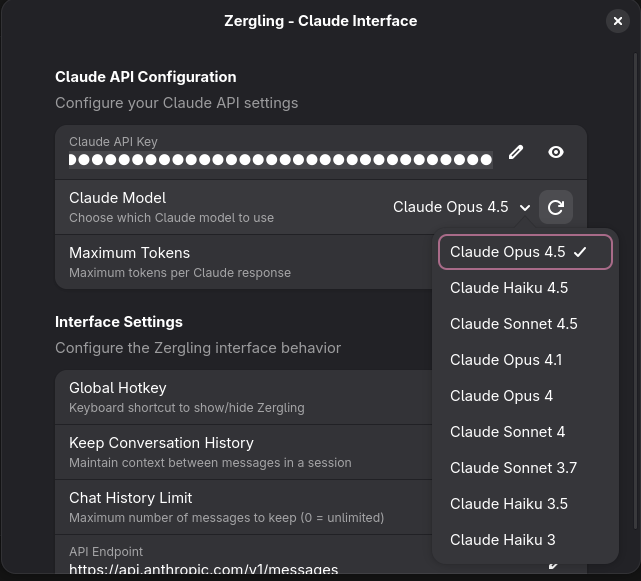
Nice. The models we had previously were quite out of date...
const FALLBACK_MODEL_IDS = [
  "claude-3-5-sonnet-20241022",
  "claude-3-5-haiku-20241022",
  "claude-3-7-sonnet-latest",
  "claude-sonnet-4-20250522",
  "claude-opus-4-20250522",
];
Now that we're set up, we can get started in the next edition with creating the Zergling service that runs behind the extension and allows always-on work and building the MCP server to grant tool access to our swarm!